Coming from Quicken?
The Quicken alternative that’s actually yours to keep.
Quicken used to be a program you bought. Now it’s a subscription — Quicken Classic runs roughly $60–$120 a year at regular rates (June 2026; first-year promos run lower), every year, and the day you stop paying it drops to read-only. GlidePath Money is the old deal done right: you pay once, your data lives in plain files you can open in any spreadsheet, and it keeps working whether or not you ever pay again.
What changed with Quicken.
For about thirty years, Quicken was a program you bought once and kept.
Then it was spun off and moved to a yearly subscription — at June 2026 regular rates, about
$60 for Deluxe, $84 for Premier, and $120 for Business & Personal, billed again every year
(first-year promotions run lower). Let it lapse and Quicken Classic goes
read-only: you can look, but not add transactions or download new ones. And your
years of history live in a proprietary .QDF file that really only opens in Quicken.
For a lot of long-time users, that’s the moment they start looking for the door.
GlidePath opens to net worth, reserves, retirement, and debt — computed on your own machine, from files you own.
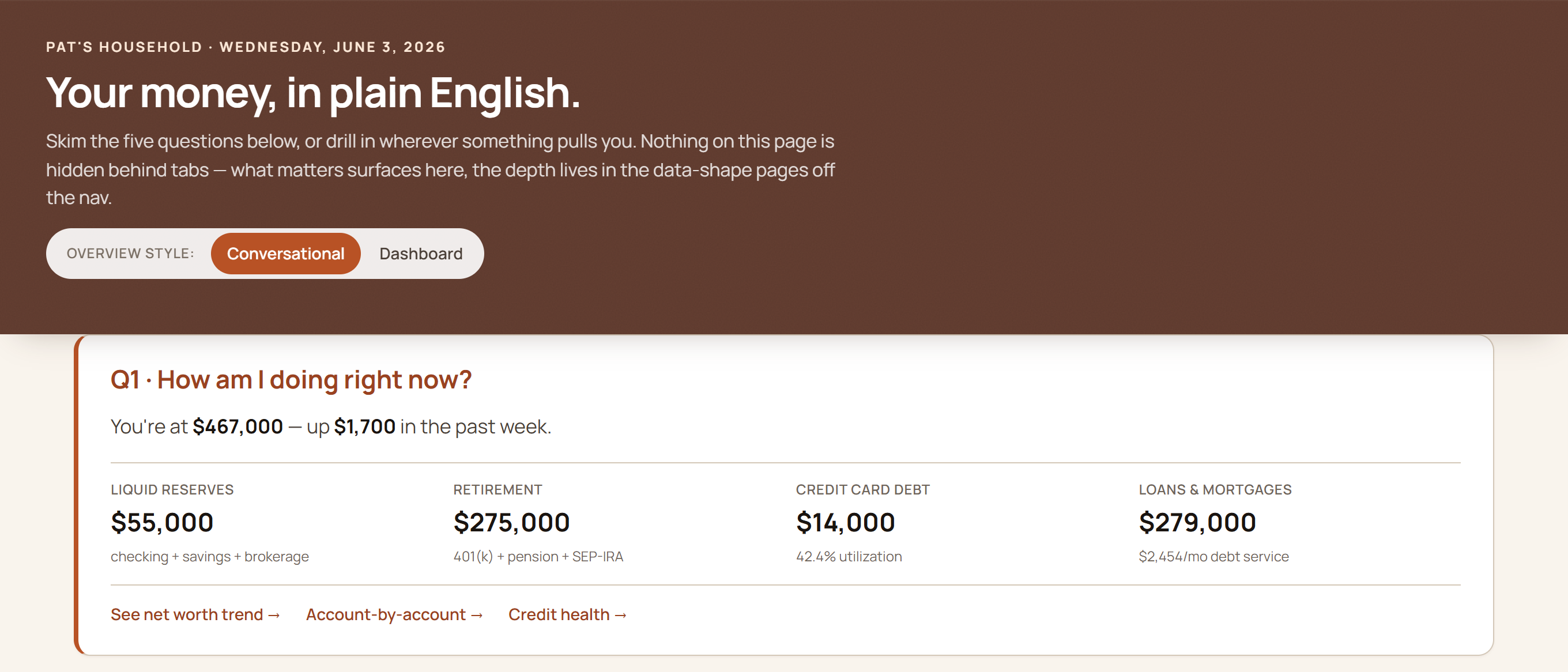
No proprietary file, nothing to renew to keep your data readable — plain files you can still open in twenty years.
Three things that are different here.
Pay once, not every year
$129 one-time (or $199 with the business tools), plus an optional $39/yr for updates — about $285 over five years versus roughly $300–$600 for Quicken Classic renewing each year at June 2026 regular rates. Stop paying and GlidePath keeps working in full; Quicken Classic drops to read-only.
Plain files, not a locked format
GlidePath stores everything as plain files — spreadsheet-readable tables plus notes —
sitting in a folder on your computer. Back them up, open them anywhere, read them in any decade.
No proprietary .QDF, and no app required just to get your own numbers out.
It looks forward, not just back
Quicken is a deep ledger of what already happened. GlidePath adds what it leaves thin: retirement run through 1,000 market futures, your Tax Valley for timing Roth conversions, 0% balance-transfer countdowns before the rate snaps back — with the math visible, not a black-box score.
The honest tradeoff.
Quicken has a thirty-year head start on breadth. That part’s real.
Quicken auto-downloaded transactions, tracks investment lots in fine detail, and bolts on extras like bill pay. GlidePath is leaner and a little more hands-on — it brings data in two ways:
- A free browser extension that captures your download in one click on Chase, American Express, Citi, and Bank of America (more coming).
- Drag-and-drop CSV import for every other bank (plus PDF statement import for Chase, American Express, and Bank of America).
If you live in investment-lot minutiae or want bank bill-pay inside the app, Quicken still does more there. If you’d rather own your tool, keep your data in open files, and actually plan ahead — that’s the trade GlidePath is built for.
Bring your Quicken history.
You don’t have to start from zero.
Export your transactions from Quicken to a spreadsheet file and drop them onto GlidePath’s Import page — format auto-detect reads them and your history comes right along. The full walkthrough, including Simplifi and Monarch, is here: how to import from Quicken & co. →
Own it again.
$129 one-time for Personal, $199 for Personal + Business. Optional $39/yr keeps you current; stop any time and the app keeps working — in full, forever.
GlidePath shows you the math — for your specific situation, talk to a fiduciary advisor or CPA.