GlidePath Money

Product demo

See it before you buy it.

The homepage describes a loop: capture your data, check the picture is trustworthy, see what changed, handle one thing, done. This page walks that loop through the real app — the same build customers install, loaded with a fictional demo household. No sign-up to view, and the purchase carries a 30-day money-back refund, so trying the real thing is low-stakes too.

Windows 10/11 · macOS · Linux · your financial file stays local by default

Act 1 · Capture

Your data arrives without handing over a bank login.

Four ways in, all on your terms: type a balance, drop in a bank CSV or PDF statement, bring exports from Monarch, Simplifi, or Quicken, or let the browser extension catch exports while you bank. Files you drop in preview exactly what will change before anything saves; extension captures land deduplicated on a Captured page where you review what arrived.

The extension catches a bank export

You export at your bank like always; the extension hands the file to the local app.

Fictional Northwind Bank data. Your bank login stays with your bank; GlidePath imports the file you choose to send.

…and becomes spending you can interrogate

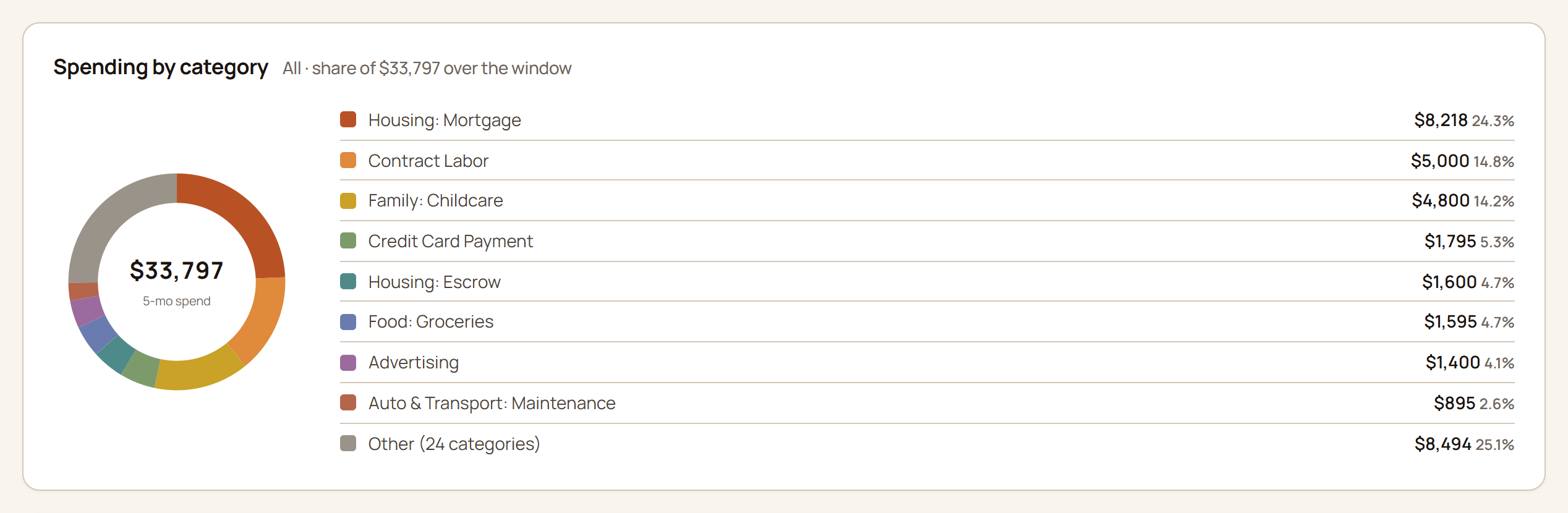
Imported transactions pick up categories from your old app’s export, and GlidePath learns your payees from there; the charts answer “where did it actually go?”

Spending report showing a donut chart by category with dollar totals and percentage shares.

Fictional demo data.

Act 2 · Trust

Every number answers: where from, how fresh, what's assumed.

Before you act on a picture, you get to check it. Major numbers carry a provenance chip — manual, imported, derived, or modeled, and how old the reading is — and the projections wear a confidence label with the assumptions one click away.

Retirement verdict, with its work shown

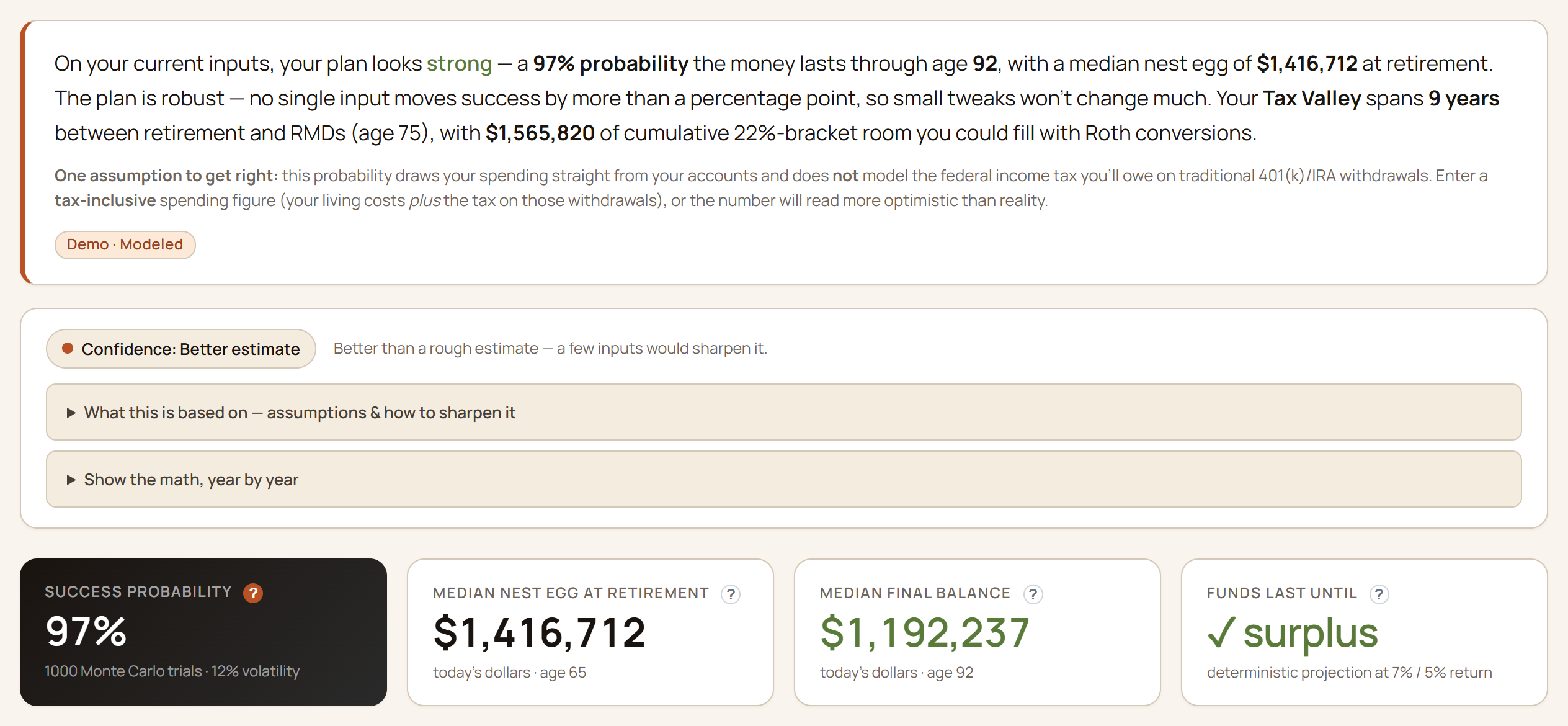
A plain-English verdict, the confidence chip, and 1,000 simulated futures (a Monte Carlo — many random market paths, counted up) with sequence-of-returns risk.

Retirement summary from the demo household: a plain-English verdict, a confidence chip with expandable assumptions, and four headline cards — 97% success probability across 1,000 Monte Carlo trials, median nest egg, median final balance, and a surplus check.

Fictional demo data. Projections are information, not advice.

The same habit runs through the whole app: the dashboard's headline numbers, the balance-transfer cockpit, the tax views — each one shows its sources and its math rather than asking to be believed.

Act 3 · What changed

Open the app, read the delta, not a spreadsheet.

The overview reads like a person explaining your money: where you stand, what moved, and what's worth a look — so a two-minute check-in is actually two minutes.

The dashboard

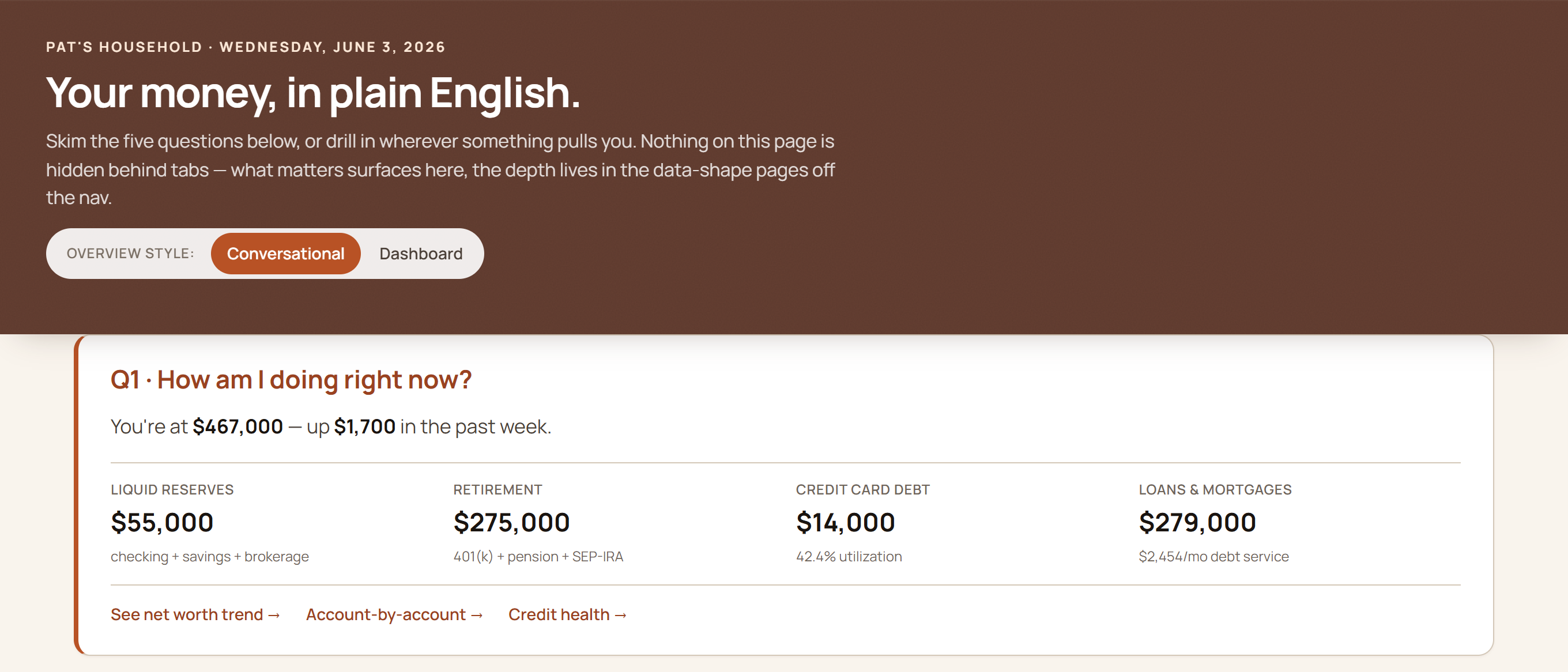
Net worth, liquid reserves, retirement, and debt — in plain English, computed on your own machine.

GlidePath Money home dashboard headed 'Your money, in plain English,' showing net worth with stat cards for liquid reserves, retirement, credit-card debt, and loans.

Fictional demo household. Your install opens to your numbers, from files on your computer.

Net worth, over time

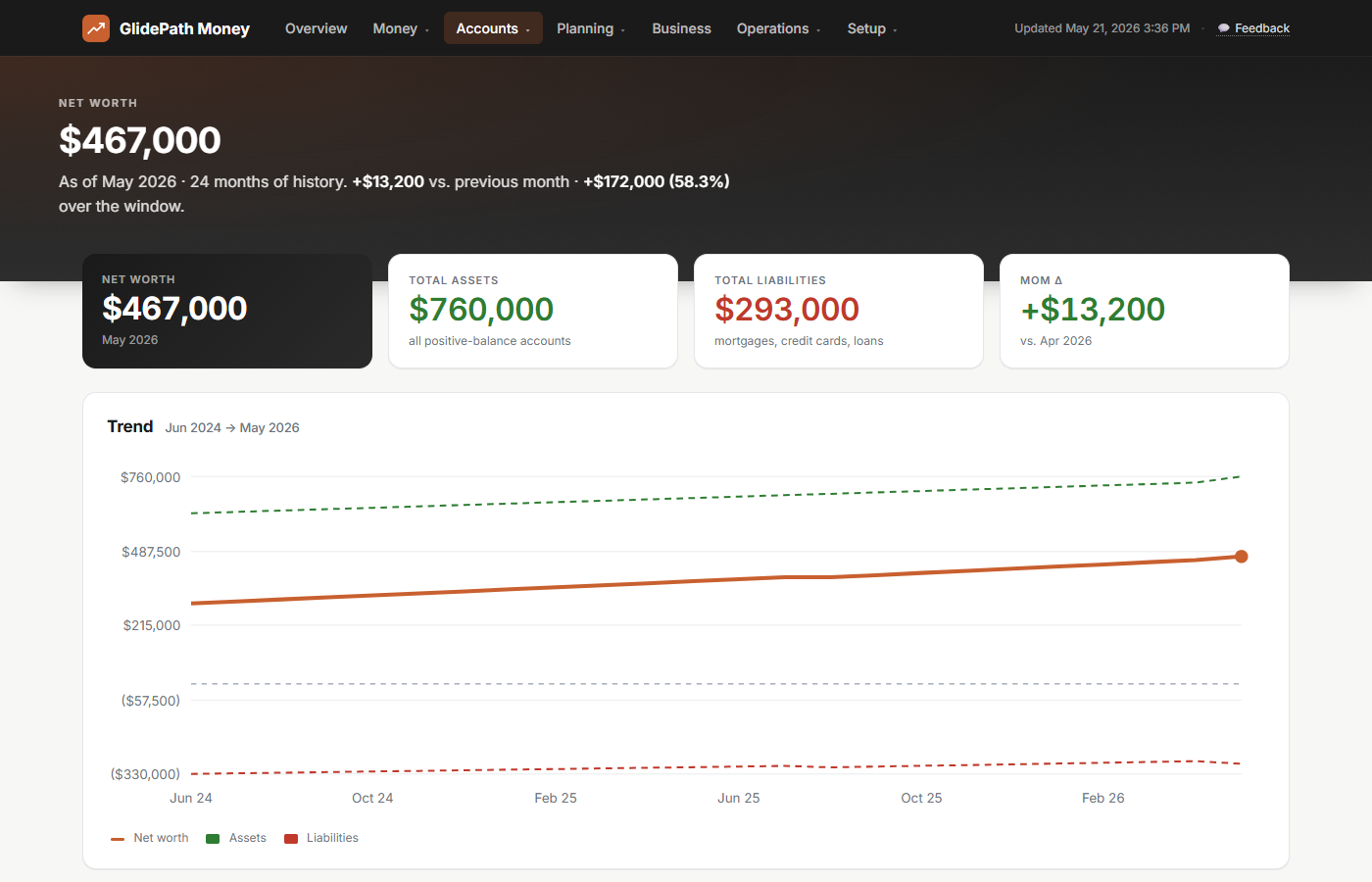
Every account on one line you can actually explain — what's in it, when it moved, and why.

GlidePath Money Net Worth page showing net worth of $467,000, total assets $760,000, total liabilities $293,000, and a trend chart climbing 58.3% over 24 months.

Fictional demo data.

Act 4 · The depth

When the question is bigger, the math is ready.

These aren't daily chores — they're the deeper rooms you enter when one quick action connects to a bigger question. This is the part trackers skip: the retirement, tax, and debt math runs on your machine, with the work shown.

The 0% balance-transfer tracker

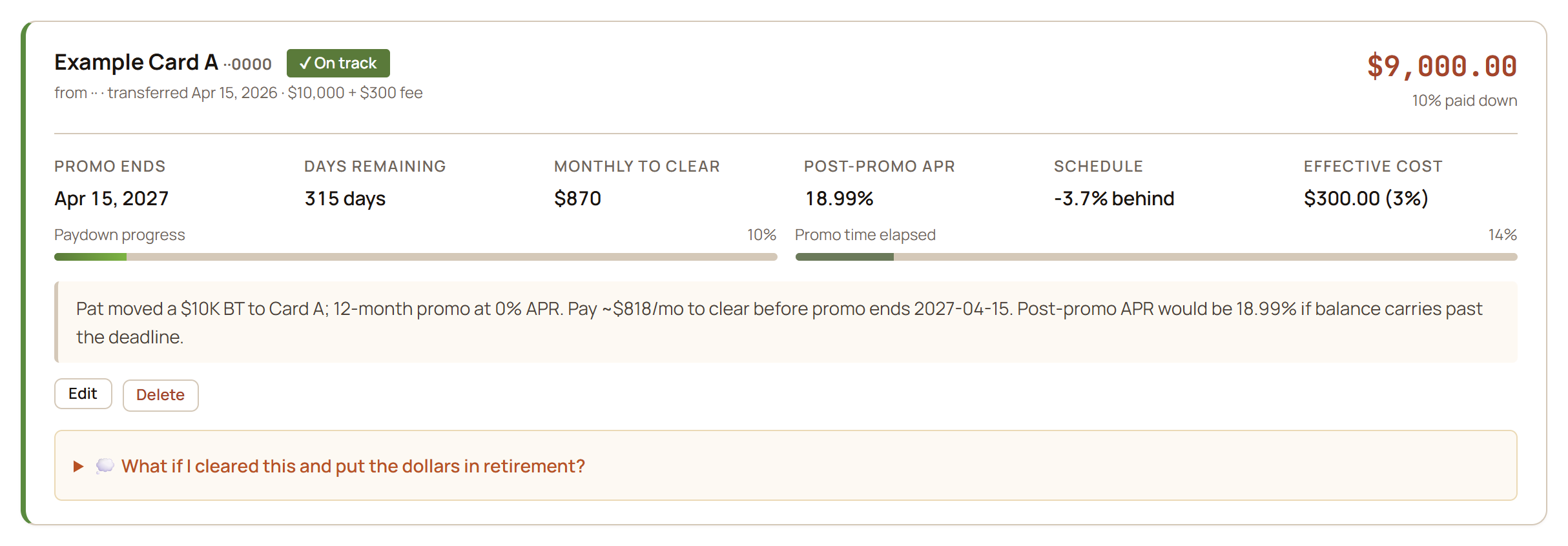
Promo deadline, the post-promo interest rate (APR), monthly-to-clear pace, and whether payoff is keeping up with the clock.

Balance-transfer card showing promo end date, monthly to clear, post-promo APR, days remaining, and paydown progress versus promo time elapsed.

Fictional demo data. The full walkthrough lives on the balance-transfers page.

The signature move: the ripple

One decision, traced through the rest of your plan.

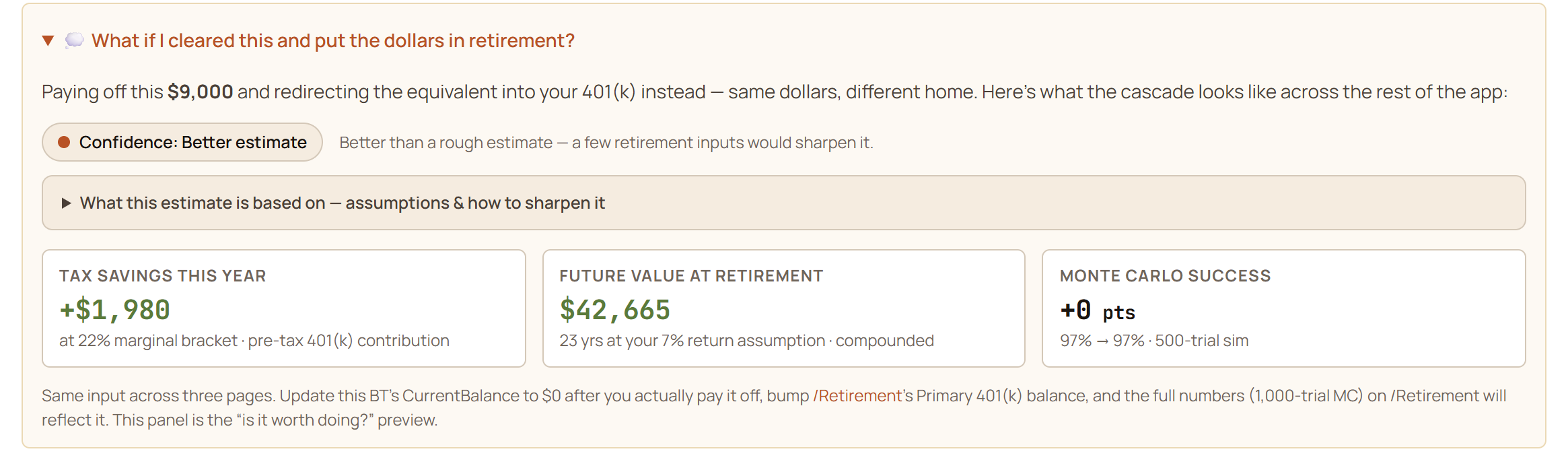
Every active balance transfer carries a what-if panel: if this card were cleared and the same dollars went to retirement instead, what actually changes? For the demo household's $9,000 transfer, the cascade reads: about $1,980 of tax saved this year (pre-tax 401(k) dollars at an assumed 22% bracket — dial it to yours), roughly $42,665 of future value by retirement at their 7% return assumption — and an honest +0 points on their Monte Carlo success, because at 97% there's almost no room left to improve. It would be easy to hide that last number. Showing it is the point: the math tells you when something doesn't move the needle, too.

The cascade panel, on a real BT row

Tax effect, future value, and the success-probability delta — with a confidence label and the assumptions one click away.

Balance-transfer cascade panel asking 'What if I cleared this and put the dollars in retirement?' showing +$1,980 tax savings this year at a 22% marginal bracket, $42,665 future value at retirement over 23 years at a 7% return assumption, and an honest +0 points Monte Carlo change (97% to 97%), with a confidence chip and an expandable assumptions panel.

Fictional demo data. A what-if, not a recommendation — the decision stays yours.

Three payoff strategies, side by side

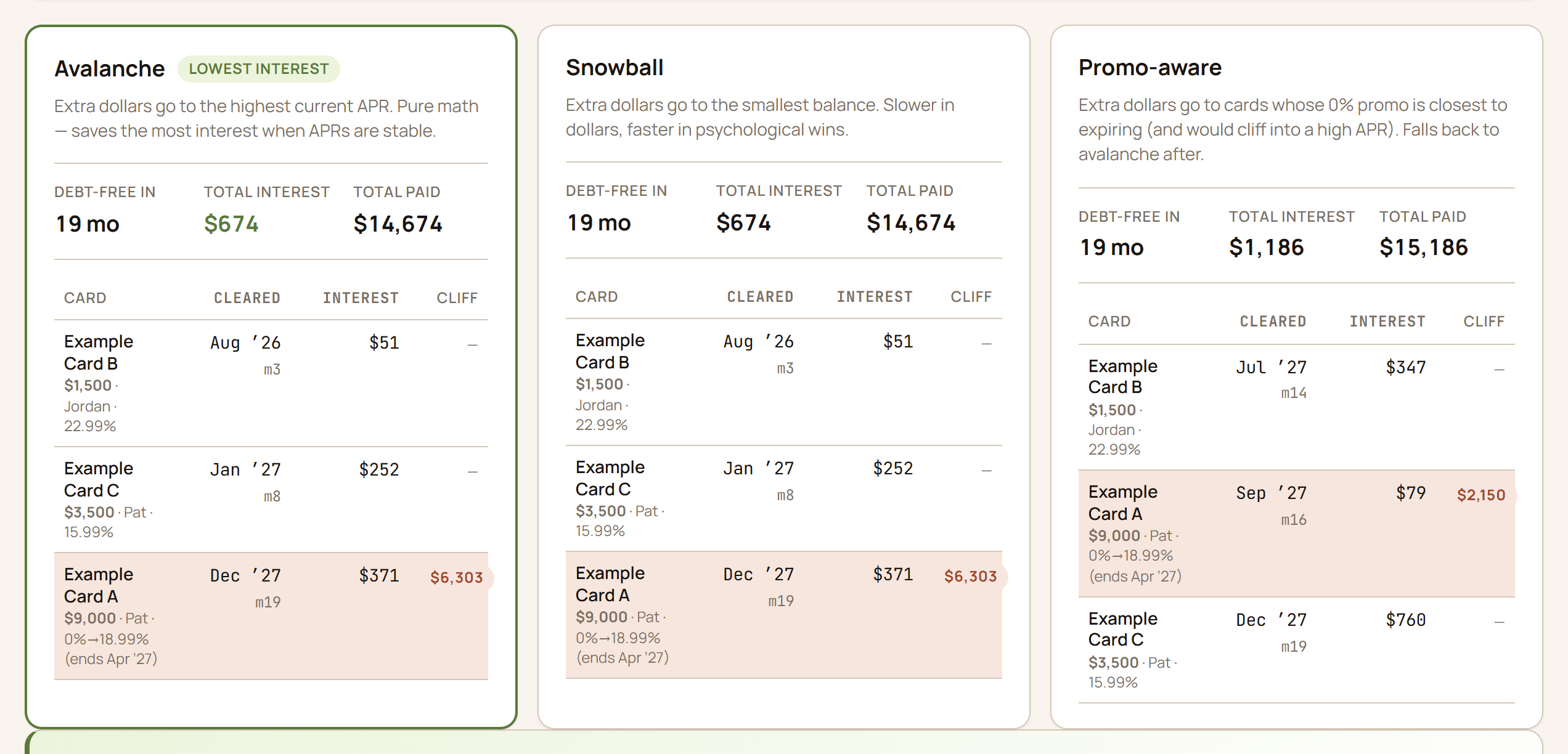
Avalanche, snowball, and promo-aware — the simulator marches month-by-month, applies each card’s real APR (including 0% promos and post-promo cliffs), and shows the dollar difference.

Payoff simulator comparing avalanche, snowball, and promo-aware strategies across multiple cards, showing the debt-free month and total interest for each.

Fictional demo data. It runs all three so you can compare; the decision stays yours.

Holdings & allocation

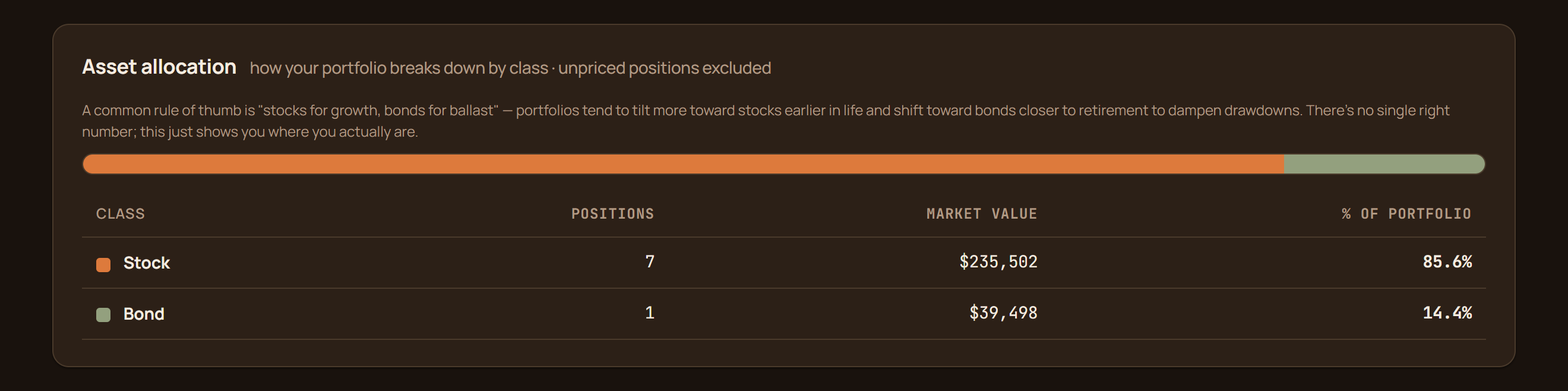
Positions and asset allocation across accounts. For price refresh, only the ticker symbols leave your machine.

Holdings page with positions, per-symbol prices, and an asset-allocation roll-up chart.

Fictional demo data.

Run a business on the side? It's covered.

The Personal+Business tier adds the self-employment toolkit — invoices, Schedule C, depreciation, mileage, and a year-end pack for your accountant.

Schedule C preview

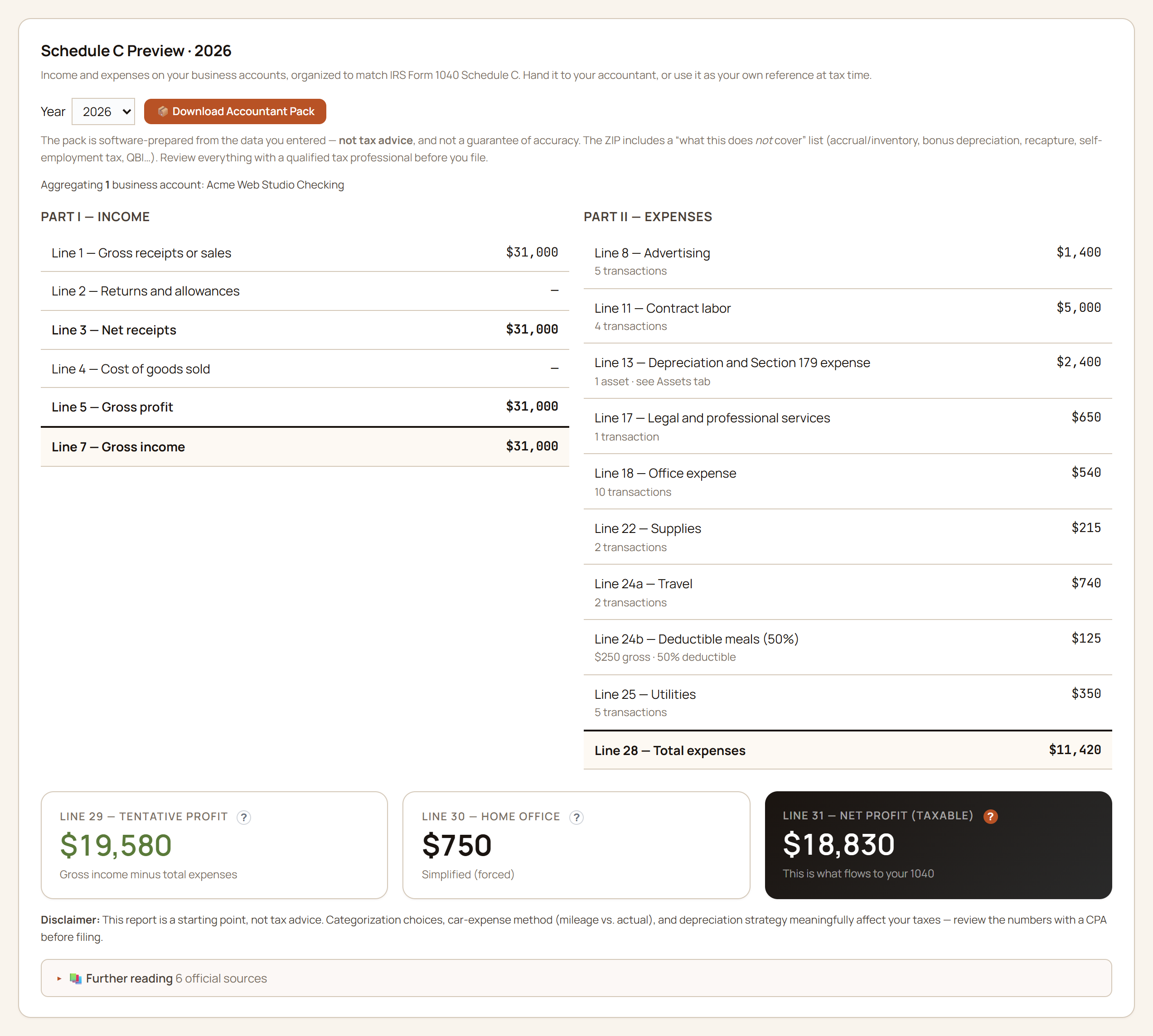
Business transactions mapped to the IRS lines, all year long — not in a panic the first week of April.

Business page showing a Schedule C profit-and-loss preview with income and expense lines mapped to IRS categories.

Fictional demo data. Estimates for planning, not for filing.

Invoices

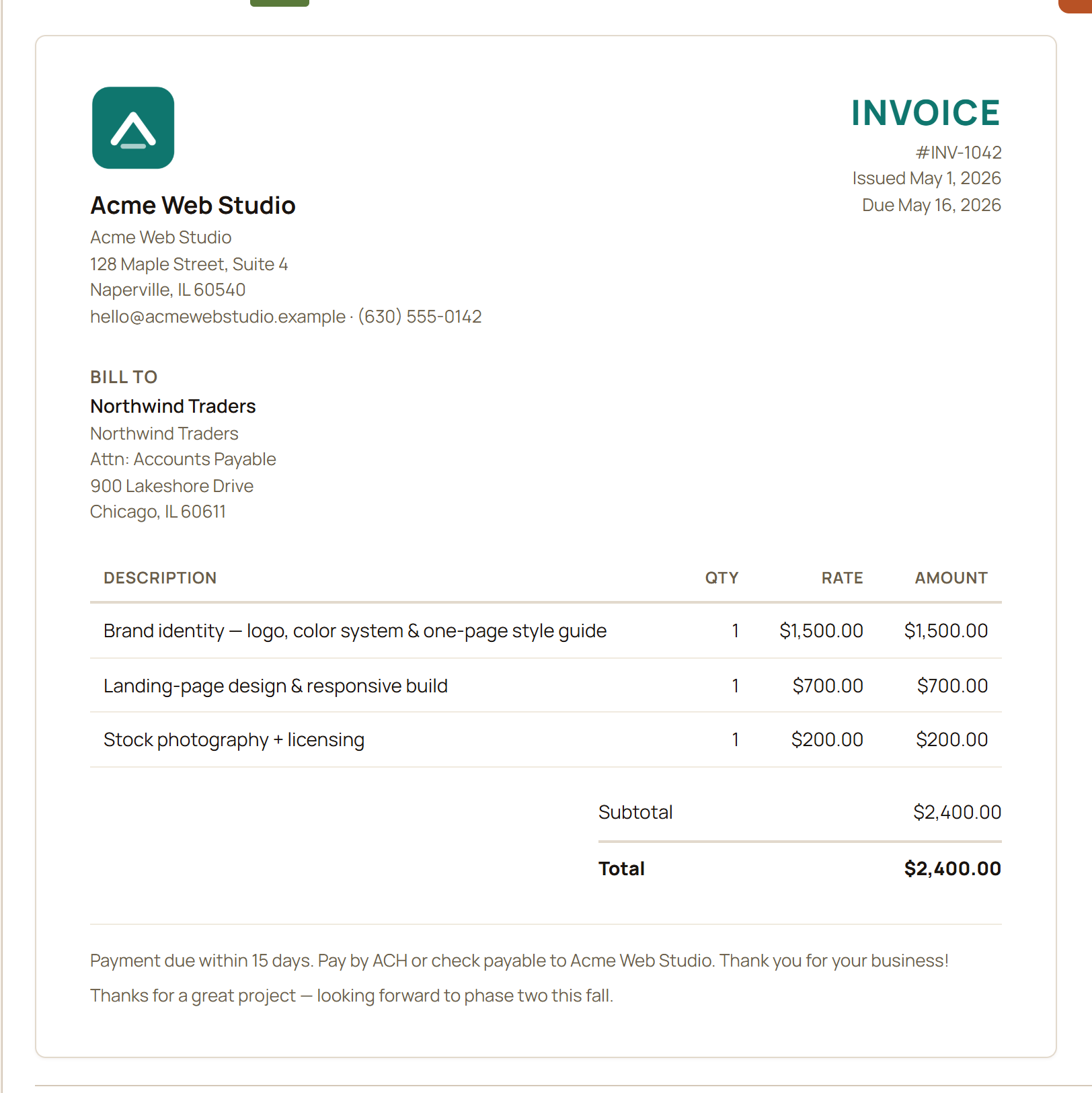
Branded PDF invoices in about a minute — then record each paid one straight to Schedule C income.

Invoice creator showing a branded invoice preview with line items, tax, and a one-click PDF export.

Fictional demo data.

Guided proof

Four households ship inside the app. Pick yours.

Everything above used one fictional family — but the app ships four demo households, each built around a different money moment. After you install, load any of them from the Setup page with one click, walk the same screens, then replace it with your own data when you're ready.

Maya Rivera — just starting out

Single, 28. Student loan, a 0% balance-transfer countdown, a first 401(k), and a house-down-payment goal.

“I finally make decent money — why does it keep evaporating?”

Her balance transfer has a visible deadline and a pace read — is the payoff keeping up with the promo clock? Her goals page turns “save for a house someday” into a bar that moves when her balances do, and the retirement page runs a real projection for a 28-year-old instead of telling her to come back in 20 years.

The Hwangs — almost retired

Dual-income couple, early 60s. Taxable brokerage, vested RSUs (company shares already theirs), a paid-off home.

“We saved well. When can we actually stop — and what about all this company stock?”

Their Tax Valley view finds the low-tax years between retiring and required withdrawals — the window where a Roth conversion (moving pre-tax retirement money to after-tax at today's rates) is cheapest to model. The ACA bridge panel prices health coverage before Medicare, and the equity pages put a number on how concentrated they are in one ticker.

Ruth Bennett — retired & drawing down

Single retiree, 76. Social Security, a survivor pension, IRA required distributions, Medicare.

“Is the money going to last — and what does the IRS make me take out this year?”

Her required minimum distributions (the IRS-mandated annual IRA withdrawals) are computed from her actual age and balance, her drawdown runs through the same Monte Carlo as everyone else's plan, and Medicare premiums sit in the ledger as real transactions — not a footnote.

The Acme family — the everything household

Mid-career dual-income couple with kids, a mortgage, RSUs, and a freelance side-business.

“Family money AND a side business — can one app hold the whole thing without drowning us?”

The household money and the Schedule C world live side by side without bleeding into each other: family cash flow, the mortgage, and retirement on one side; invoices, deductible expenses, mileage, and a year-end accountant pack on the other. This is the household in most screenshots on this page.

All four are fictional. Each household's story is built into the app's demo data and exercised by its automated tests, so the demo never promises a screen the app doesn't deliver.
Like what you see?

The whole app works like these pages read: plain English, visible math, your data on your machine. Buy it once, try it on your real numbers, and if it’s not for you, the 30-day refund means you’re out nothing.

Screenshots show fictional demo households. GlidePath Money is an educational planning tool, not financial, tax, or investment advice.