Equity compensation
Your RSUs are real money. Track them like it.
If your employer pays you partly in company stock, it's easy to lose the thread — what's vested, what's still coming, what it's worth, and the tax that lands every time shares vest. GlidePath keeps all of it on one Equity page: RSUs (restricted stock units), stock options, and ESPP, vest by vest.
Every figure — the tax withheld at vest, your cost basis, the gain when you sell — is shown with its math and computed on your own computer, from grants you enter. No brokerage login.
What's yours, what's coming
Add a grant and lay out its vesting schedule in a couple of clicks — or import it. See the net shares you actually hold today, valued at the latest price, kept separate from what hasn't vested yet. Vesting just means shares becoming yours to keep over time.
The tax part, in plain numbers
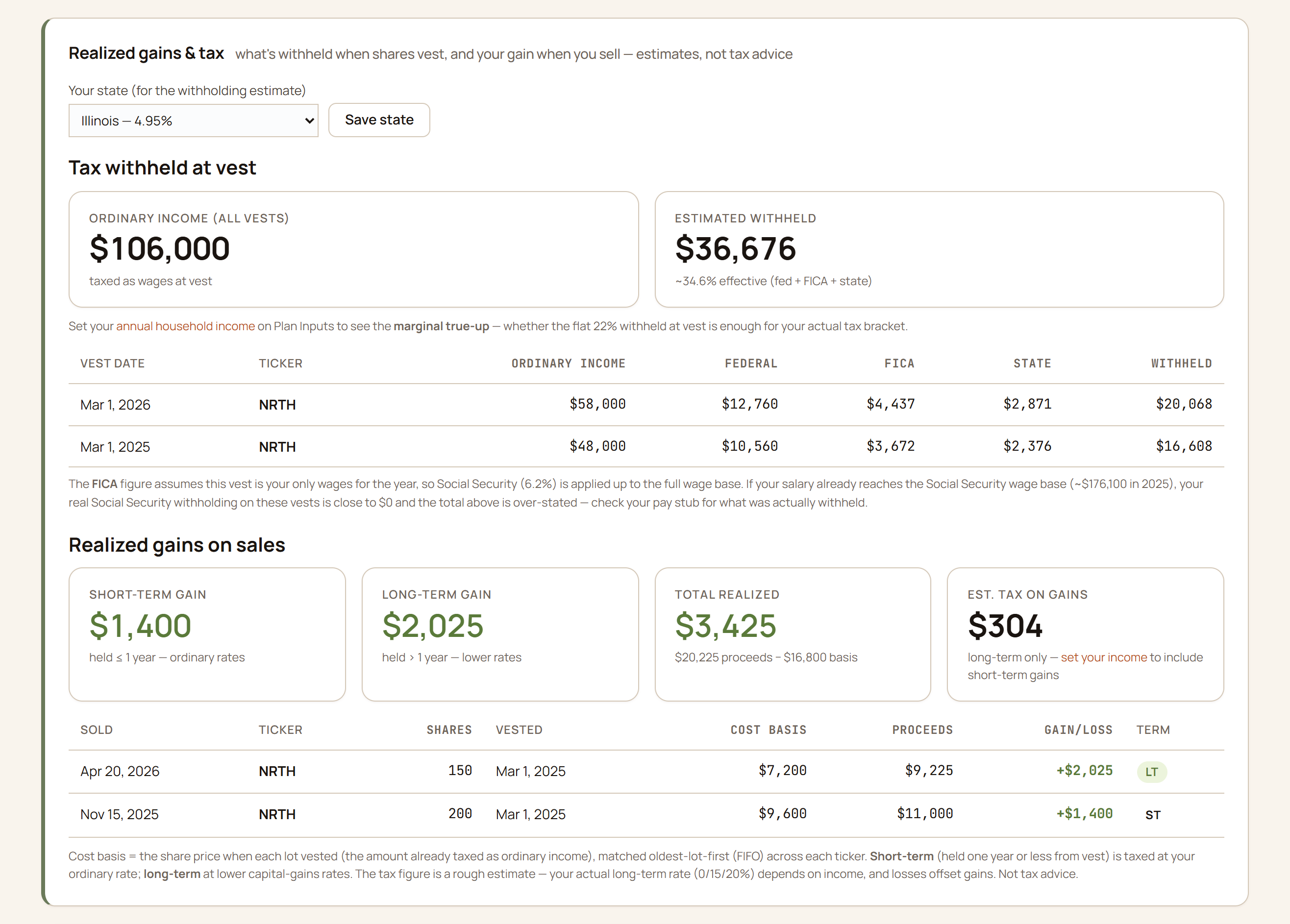
An estimate of what's withheld each time shares vest — federal supplemental, Medicare, Social Security, and your state — plus your realized gain when you sell, first-in-first-out, split short- vs long-term. Estimates to plan with, never tax advice.
How much rides on one company
Your paycheck and a chunk of your net worth can depend on the same stock. GlidePath shows that concentration as an honest read — vested stock measured against your investable assets, never silently added to your net-worth total, so the same shares are never counted twice.
One grant, marker by marker
A real grant card from the app, shown with a fictional demo household — no finance background needed.

- What's actually yours The net shares you've vested and still hold, valued at the latest price — not the headline grant number. The honest “yours today.”
- What's still coming Shares that haven't vested yet. Your base retirement plan leaves these out until they're real — you opt in to the upside when you want to see it.
- The whole grant, one number Every tranche marked to the current share price, so you always know what the grant is worth right now.
- Every vest, with the tax bite Each vest date shows the shares withheld for taxes and the price they vested at — the cost basis you'll need when you sell.
The tax hit, estimated for you
The two questions equity comp always raises — “how much got withheld?” and “what do I owe when I sell?” — answered with the math shown, and clearly labeled as estimates.
Don't get blindsided by concentration
When a lot of your money rides on one employer's stock, it helps to see it plainly — stated as an analysis, never a nudge.

Bring grants in from your broker
Already have your grants in a spreadsheet or a broker export (Fidelity, Schwab, E*Trade, Merrill, and others)? Import them from a CSV — map your columns once and it's remembered next time. A grant summary or a full vesting schedule both work, and you'll see exactly what will land before anything saves. As always, the file stays on your machine; to look up a current price, the only thing sent out is the ticker symbol.
Ready to track your equity comp?
Desktop license. Your installed version keeps working, and your financial files stay on your machine.
GlidePath shows estimates and assumptions so you can plan and have a sharper conversation with a tax professional. It is not tax or investment advice.
Equity comp, answered
Can I track RSU cost basis after vest so I'm not double-taxed when I sell?
Yes. GlidePath records each vest at the price it vested (your cost basis) and the shares withheld for taxes, so when you sell, the gain is figured from the right basis — not the $0 basis brokers often report.
Does it track stock options and ESPP too, or just RSUs?
RSUs, stock options, and ESPP all live on one Equity page, vest by vest, marked to the current share price.
Does my equity fold into the retirement plan?
Yes — you can opt in to model vested and unvested shares in the retirement projection. For your headline net worth, enter the brokerage balance of the vested shares you hold under Accounts; the Equity page keeps grant values separate so the same shares are never counted twice.