For side businesses & the self-employed
Run the business side of your money — without hiring a bookkeeper.
Freelance, an Etsy shop, a weekend gig, a single-member LLC: the Personal + Business tier turns the transactions you already track into invoices, a year-round Schedule C, mileage and home-office numbers, and a year-end pack your CPA opens in one folder — every figure traceable, computed on your machine.
Explore opens a fictional side-business household — no license key, account, or email. Bookkeeping, not tax advice; the judgment calls stay with you and your CPA.
Invoice · paid
Invoice #1042 marked paid — recorded as $2,400 on Schedule C.
Matched to one deposit in this single-payment example · one confirmed action
Schedule C net profit · 2026
$18,830
▲ updates as you go · ready by Dec 31
Deductions found
1,240 mi → $899
Mileage + home office, at the current IRS rate
Real app screens
What Personal + Business actually looks like.
The business tools are not a separate spreadsheet or a promise for tax season. They live inside the same local ledger as the rest of GlidePath, using fictional demo data here so the workflow is visible without exposing anyone’s finances.
The business toolkit, one piece at a time.
Everything in Personal — the planning, the balance-transfer and subscription tools —
plus the /Business workspace below.
Invoices
Create branded invoices, then file the ones that get paid.
Add a client and a few line items and you get a clean PDF with your own logo and brand color, ready to send in about a minute. When one gets paid, mark it Paid and GlidePath finds matching deposits in your business account. A single payment takes one confirmed match; split payments stay open until each deposit is linked. Each confirmed deposit is recorded as income on your Schedule C. The client-facing invoice sheet matches the PDF; the on-screen page also carries your internal payment, credit, recurring, file, and deposit-tracking controls. And when a return, goodwill discount, or write-off happens, issue a credit note: it shows on the client statement and lowers what’s owed, and it’s never counted as money you collected. Walk through it →
Schedule C P&L
A Schedule C that’s basically done by December 31.
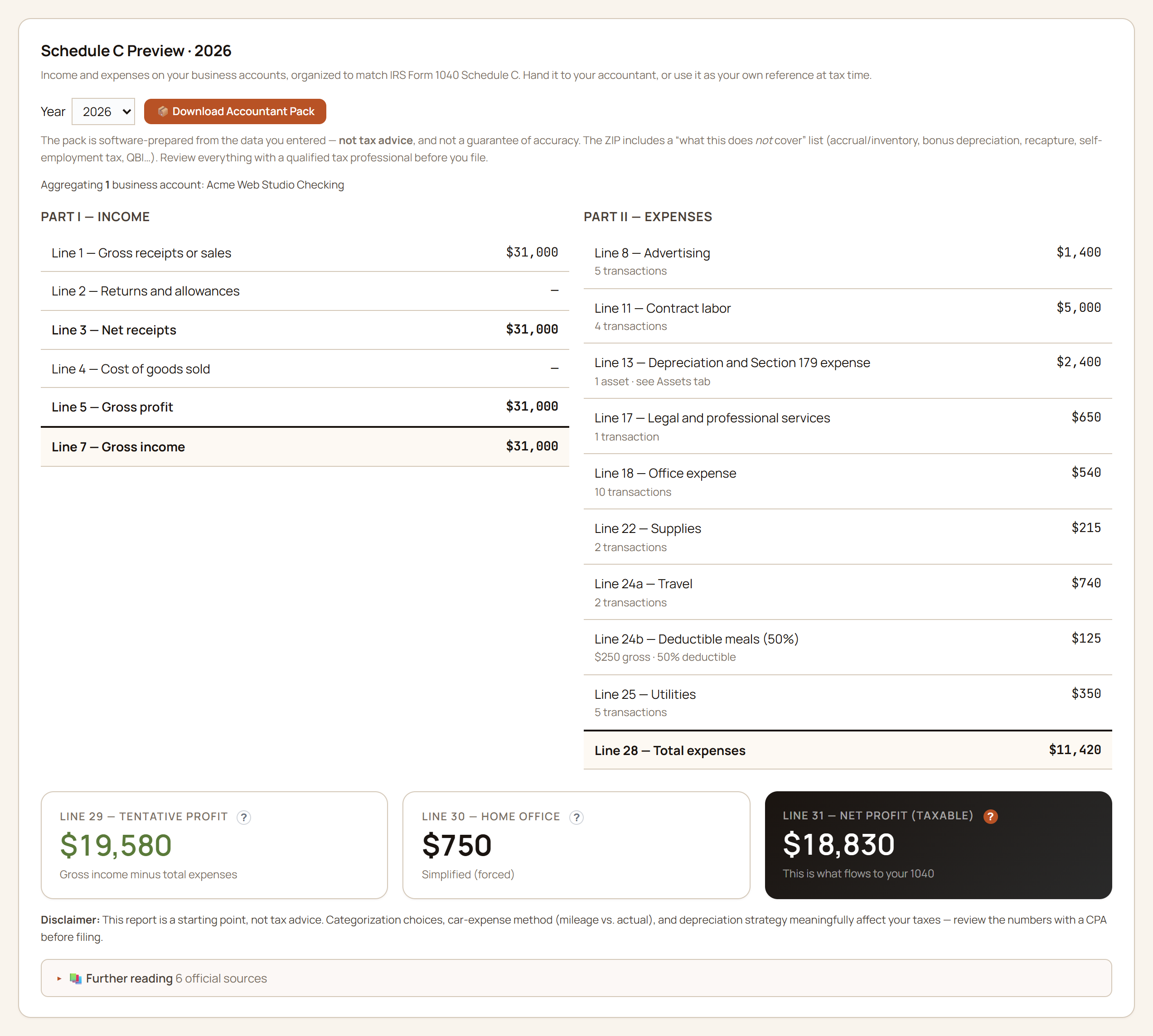
Map your spending categories to IRS Schedule C line numbers once, and every business transaction you categorize during the year flows to the right line automatically. The year-end report is a one-page P&L plus a clean CSV your CPA can work straight from — no retyping numbers off a PDF. See the full flow →
Owner’s draws
Paying yourself stays a transfer, not income.
Tag a transaction as an owner’s draw or an owner’s contribution and GlidePath treats it as a transfer between you and the business — never Schedule C income or an expense. The Business page totals what you’ve taken out and put in across the year, so “what has the business actually paid me?” has an answer that doesn’t distort profit.
Mileage log
A mileage log built for tax time.
Log each trip — date, miles, business purpose — or bulk-import a whole year from MileIQ, Everlance, Stride, or any mileage CSV (kilometres convert automatically). GlidePath multiplies by the standard mileage rate for that tax year. Pick the standard-mileage or actual-expense method; it keeps you from accidentally double-dipping.
Home office
The home-office deduction, both ways.
Enter your office and home square footage and see the simplified method ($5/sq ft, up to 300 sq ft) next to an actual-expense estimate, so you can see which is likely worth more before you (or your CPA) decide.
Asset depreciation
Equipment depreciation, tracked.
Bought a laptop, a camera, a work vehicle? GlidePath tracks Section 179 and the MACRS 5- and 7-year schedules so the deduction shows up on the right year’s Schedule C instead of getting forgotten.
Schedule SE
Self-employment tax, separated from income tax.
GlidePath estimates the Social Security and Medicare side of self-employment tax from Schedule C profit, with the deductible half kept separate. It is a planning receipt your CPA can compare against Schedule SE, not a filed return. See the self-employment tax page →
Estimated taxes
The safe-harbor line, and what you’ve set aside against it.
Enter last year’s total tax and GlidePath shows your federal safe harbor — the IRS’s bright-line threshold for the year’s prepayments (100% of last year’s tax, 110% at higher incomes, or an opt-in 90%-of-this-year estimate) — split across the four payment dates. A set-aside jar fills as your estimated-tax payments land in your records, so you can see where the year stands at a glance. It shows the line and the pace; the payment decisions stay with you and your preparer.
QBI deduction
A 20% deduction estimate with the guardrails visible.
The QBI page starts with qualified business income, applies the 20% frame, and keeps taxable-income, wage/property, and specified-service caveats in view so the number stays reviewable. See the QBI calculator →
Solo 401(k) / SEP
Self-employed retirement room without the napkin math.
Employee deferral, employer contribution, catch-up, and annual plan limit sit in one maximizer so a self-employed household can see the moving parts before handing the year to a preparer. See the solo-plan page →
1099 prep
See who might need a 1099 before January.
GlidePath totals what you paid each contractor and flags who crossed the reporting threshold — so filing season isn’t a scramble to reconstruct who you paid and how much. (Corporations and card/PayPal payments are exempt — confirm before you file.)
Accountant pack
Hand your CPA one folder, not a shoebox.
One click builds a year-end ZIP — the P&L, the supporting worksheets, the category CSVs, and a plain-English README. Email it to your accountant and they have everything in one place, already organized by Schedule C line.
From “I did the work” to “my taxes are basically done.”
The pieces above aren’t separate apps stapled together — they’re one workflow on one ledger. Here’s the whole loop, start to finish.
One side-business year, end to end Acme Web Studio · a one-person design shop
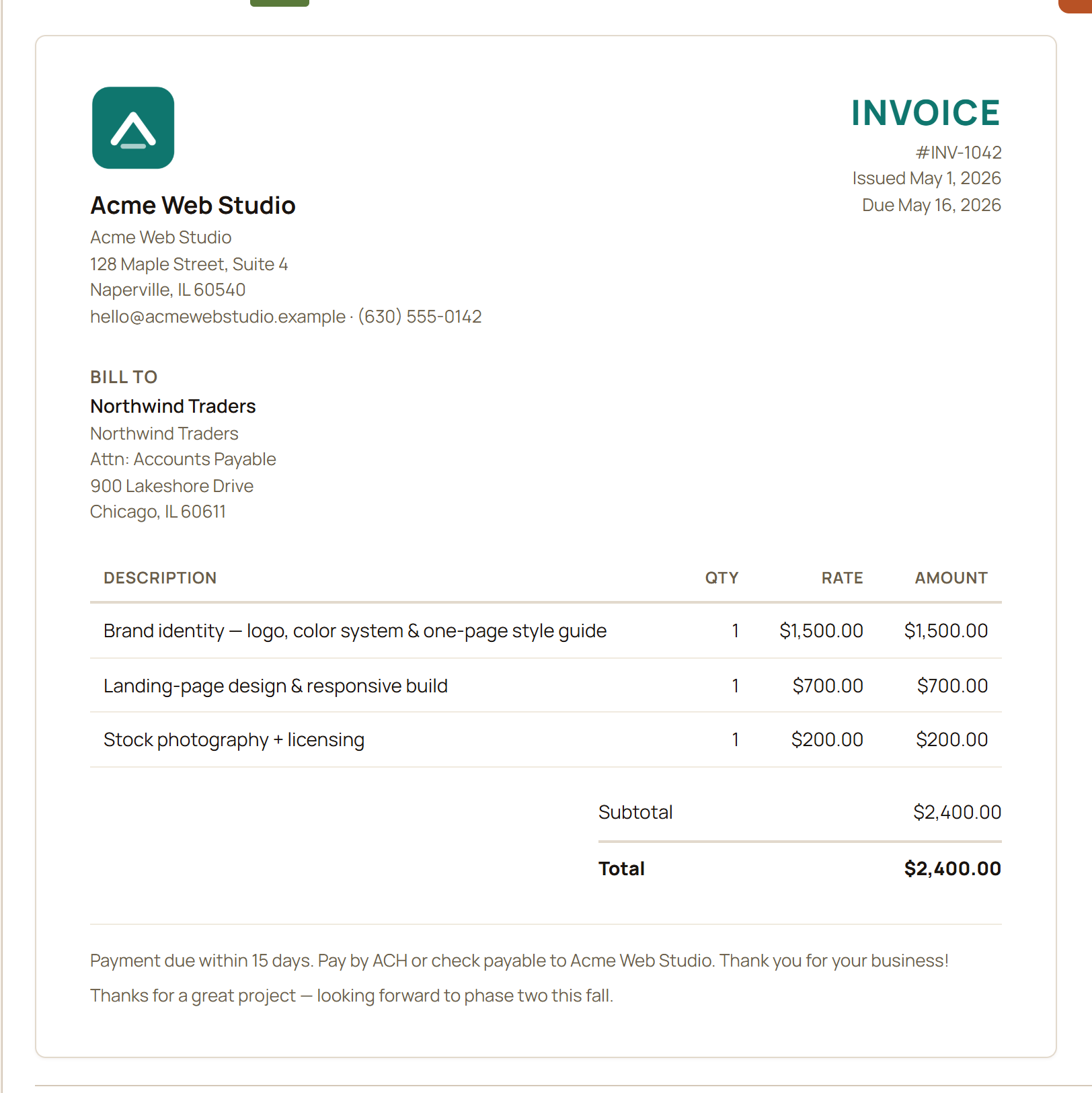
- Bill the work. Create a branded invoice for the project and send the PDF.
- Get paid. The client’s deposit lands in your business account and imports like any other transaction — through CSV, the browser extension, or a statement PDF when its layout is supported.
- Record it. Mark the invoice Paid and confirm the real deposit for each recorded payment. A single payment takes one match; split payments remain open until each deposit is linked under Schedule C gross receipts.
- Categorize as you go. Your business expenses already map to their Schedule C lines, so the P&L fills in across the year.
- Hand it off. In December, the Accountant Pack ZIP bundles the whole thing for your CPA — or you transfer the numbers straight onto the form.
Income comes from the real deposit in your account, not from the invoice itself — so what lands on your Schedule C is what actually hit the bank. Cash-basis, verifiable, and computed entirely on your machine.
- Your business identity Your logo, name, and contact details sit at the top of every invoice — set them once and they’re always there.
- Numbered and dated A running invoice number plus the issue and due dates, filled in for you.
- Who you’re billing Save each client’s details once, then pick them from a list the next time you bill them.
- Line items that add up Describe the work with a quantity and rate; GlidePath totals each line and the invoice for you.
- Total — and deposit-backed income When the client’s deposit lands, match it to Schedule C income. A single payment takes one confirmed match; split payments stay separate.
Acme Web Studio’s year, organized to match IRS Form 1040 Schedule C — income up top, expenses mapped line by line, with depreciation and the home-office deduction folded in. (Sample data; figures are illustrative.)
Every figure traces back to a categorized transaction on your business account — nothing typed twice.
The part bookkeeping alone leaves out
The business lives inside the household plan.
Bookkeeping alone stops at the P&L. In GlidePath, the side business sits alongside the household’s retirement, Roth, ACA, and cash-flow planning in one app, on one local ledger — so the business stops living in a spreadsheet the plan never sees.
To the household
Net profit shows up as household context.
The same Line 31 net profit on your Schedule C appears on the household side as context — after a visible tax set-aside cushion, and never double-counted against net worth. What the business actually cleared stops being a mystery.
Retirement room
Self-employed retirement planning reads the same numbers.
The Solo 401(k)/SEP maximizer and the QBI estimate start from the business profit you already track here — no retyping into a separate calculator, and the caveats stay on screen.
The tax calendar
Quarterly estimates and ACA years, in the same place.
Self-employment income changes quarterly estimated-tax planning and the math of ACA (marketplace health-coverage) years. GlidePath keeps both next to the household plan — the safe-harbor line beside what you’ve set aside, assumptions visible — so tax season is a review, not a reconstruction.
The fictional Acme family demo includes a freelance side business — no license key, account, or email. Planning estimates, not tax advice; the judgment calls stay with you and your CPA.
Already file a Schedule C? This is for you.
$199 desktop license for Personal + Business — or, if you already bought Personal, add the Business tier for the $70 difference from the in-app License page. Same license model: stop maintenance any time and your installed version keeps working, with all your data on your own machine.
Side-business bookkeeping, answered
Can I do my Schedule C bookkeeping on my own computer instead of a cloud accounting app?
Yes. The Personal + Business tier turns the transactions you already track into a Form 1040 Schedule C on your own machine — with invoices, mileage, home office, and 1099 prep included — and no bank login required.
Does GlidePath create invoices and record payments as income?
Yes. It builds numbered, dated invoices from saved client details and line items. You confirm the real bank deposit that paid each recorded payment; split payments remain separate until each deposit is linked.
Does it replace my accountant?
No. It does the bookkeeping and builds a year-end pack your CPA opens in one folder — every figure traceable — and the app includes planning estimates for self-employment tax and QBI. Your preparer still confirms the filed Schedule SE / Form 8995 figures and files the return. It isn't tax advice.
How much should I set aside for taxes?
Side-business profit arrives without withholding, and the IRS expects the tax in four installments rather than all at once in April. Our guide covers the self-employment-tax arithmetic behind the usual 25–30% rule of thumb, the four dates, and what the safe harbor actually protects you from.