

Core file stays local
Accounts, transactions, balances, planning inputs, and projections live on your computer by default.
Desktop planning app
Schedule C income usually lives in its own spreadsheet. GlidePath puts it in the household plan, on files you control.
A desktop planning app that puts Schedule C side-business income inside the same household plan as the rest of your money — on local files you control.
Explore mode uses fictional data and never touches your real files · no license key, account, or email · Windows 11 (24H2 or newer), macOS (Apple Silicon), and Linux
July 2026 · as of Jul 8, 6:42 PM.
A dated brief of what your files, close history, and receipts let GlidePath understand.
Live view since the Jul 3 close.
One Decision
Where should the extra $300 go this month? GlidePath puts the promo balance and the emergency buffer side by side. The choice stays yours.Safe To Ignore
Quiet for now The current basis says an HSA does not apply to this household. Quiet for now The current basis says loans or mortgages do not apply right now.App-style illustration using fictional demo numbers. The structure mirrors the shipped Money State; the choice above models its outcome here on the page. Modeled figures are examples, not predictions.
Capture without drama
Less than you’d think — and the part that’s left is inspectable. A free browser extension catches your own export as you click Download (one click on Chase, Amex, and Citi; a popup flow for Bank of America), and supported statement PDFs parse right on your machine. Nothing saves until you review it, and your login never leaves your hands.
Step-by-step video walkthroughs
Actual product screens
These are real screenshots from the current app using a fictional demo household. Each screen is meant to answer a job: what changed, what matters, what is backed by data, and where to go next.

Money State
The first screen says what your local files support, what changed, whether one decision is waiting, what can stay quiet, and how the current path echoes forward.
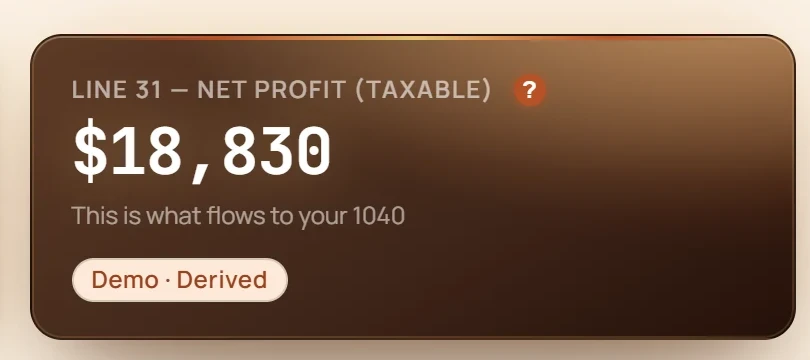
Business
The $199 Personal + Business tier adds invoices, mileage, 1099 prep, and Schedule C lines so December is a review, not a reconstruction.
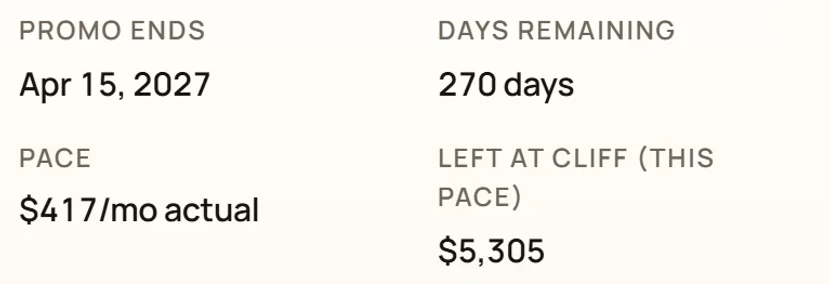
Balance transfers
Every BT shows days remaining, monthly payment to clear, post-promo APR, paydown progress, and whether the schedule is behind.
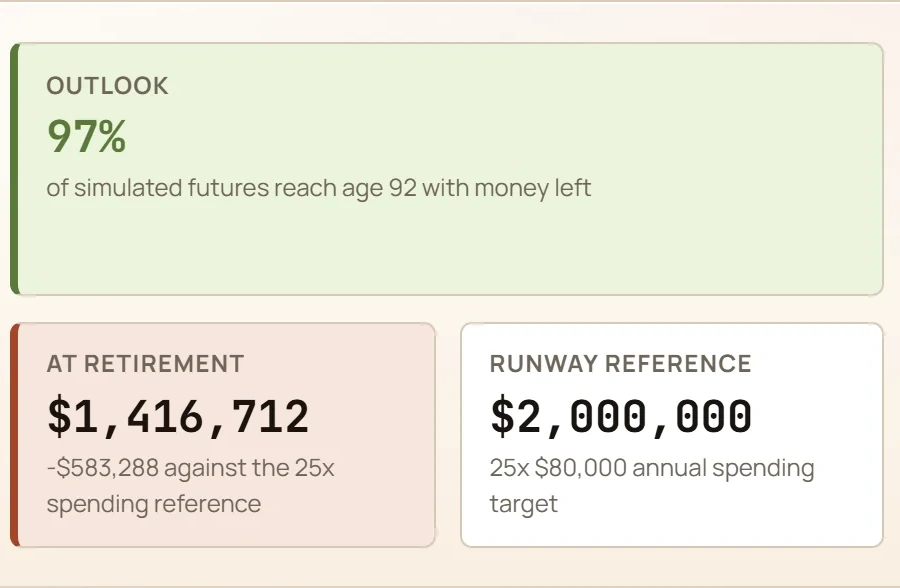
Retirement
Monte Carlo probability, the hardest-10% stress check, the at-retirement number, and plain-English context sit together instead of hiding behind a black-box score.
Invoices, RSUs and equity, spending reports, subscriptions, and the rest of it — everything it does, on one page →
More than the first four screens
The screenshots above prove the core loop. The full product carries that same clarity through daily money, ownership, planning, business, household continuity, and data control.
Demo names, account numbers, and dollar amounts are fictionalized. Screenshots are product proof, not financial advice or forecast guarantees.
How it works
Know the state of your money. See what changed. Understand what it means. Make the next decision. Be done for now. Every beat keeps its receipt.
Trust receipt
The short version should be easy to check before anyone has to read a policy. GlidePath is a local-first desktop app; online touchpoints are either required operating services or clearly labeled optional features.
Accounts, transactions, balances, planning inputs, and projections live on your computer by default.
Activation and update services see license/device metadata, not your household financial file.
AI categorization and price lookups each explain what they touch.
Privacy, security, refund, release notes, and claim checks stay linked so the public story can be verified.
If something goes wrong
Nothing saves until you’ve seen it, imports undo in one click, bigger changes get a restore point first, and a crash cannot half-write your money file. None of it is a setting to find or a tier to buy.
See the recovery guarantees →
What you're buying
Pricing should be clear before the fine print: buy a desktop license, get every feature in your tier, and keep your financial file on your machine.
Before you buy
No. GlidePath runs on local files and manual or imported data — drag-and-drop CSV import, OFX/QFX activity files for one USD bank or card account, or the optional browser extension for one-click captures. No bank-login connection required.
Your financial file stays local by default. Required touchpoints are license activation and update checks — a license key and device info, never financial data. Optional features send more only if you turn them on: AI categorization (payee, amount, date, account type, and category names for rows you choose). Each shows what it sends before you use it.
The version you bought keeps working. Your first year of updates is included. Before it ends, we email reminders 30, 15, and 5 days ahead. Another year is an optional $39 payment for eligible tax rules, bank parsers, security patches, support, and new features; nothing charges automatically.
No — it’s an educational planning tool. It shows you assumptions and tradeoffs in plain English, but it isn’t personalized tax, investment, or legal advice.
Retirement, tax windows, debt cliffs, subscriptions, and spending — with the math close enough to inspect, and none of the judgment.