
0% balance-transfer payoff
The payment to clear it before the promo ends.
The math on a 0% balance transfer is simple, and almost nobody runs it: take what you owe, divide by the months left, and that’s the monthly payment to clear it before the rate snaps back. GlidePath computes that one number for every transfer you carry — next to the post-promo APR you’re racing and whether you’re ahead of pace or behind. It shows the numbers; it doesn’t tell you what to do.
Free, no email required: print the 0% Cliff Checklist →
The monthly-pay-to-clear math.
One formula decides whether a 0% transfer is a win or a slow-motion mistake.
While the promo runs, every dollar you pay goes to principal instead of interest. But the offer only pays off if the balance hits $0 before the promo ends. The pace to get there is just division:
current balance ÷ months left in promo = monthly payment to clear
Owe $9,000 with 18 months left? That’s $500 a month to finish on time. Pay the card’s minimum instead and the account reads “current” every month while the promo quietly falls behind — until the deadline arrives with a balance still on it. GlidePath shows this figure as the Monthly to clear line on every transfer, recomputed from your current balance and the months remaining, so you’re budgeting one honest number instead of guessing.
Want to run it by hand first? The free, printable 0% Cliff Checklist walks the same math with blanks to fill in — no app required.
Every number, computed for the transfer you carry.
This is what GlidePath shows for each active 0% balance transfer — big, labeled, in plain English.
Monthly-to-clear, days remaining, the post-promo APR, and a paydown-vs-time-used pair of bars — computed on your own machine, from your own balance history.
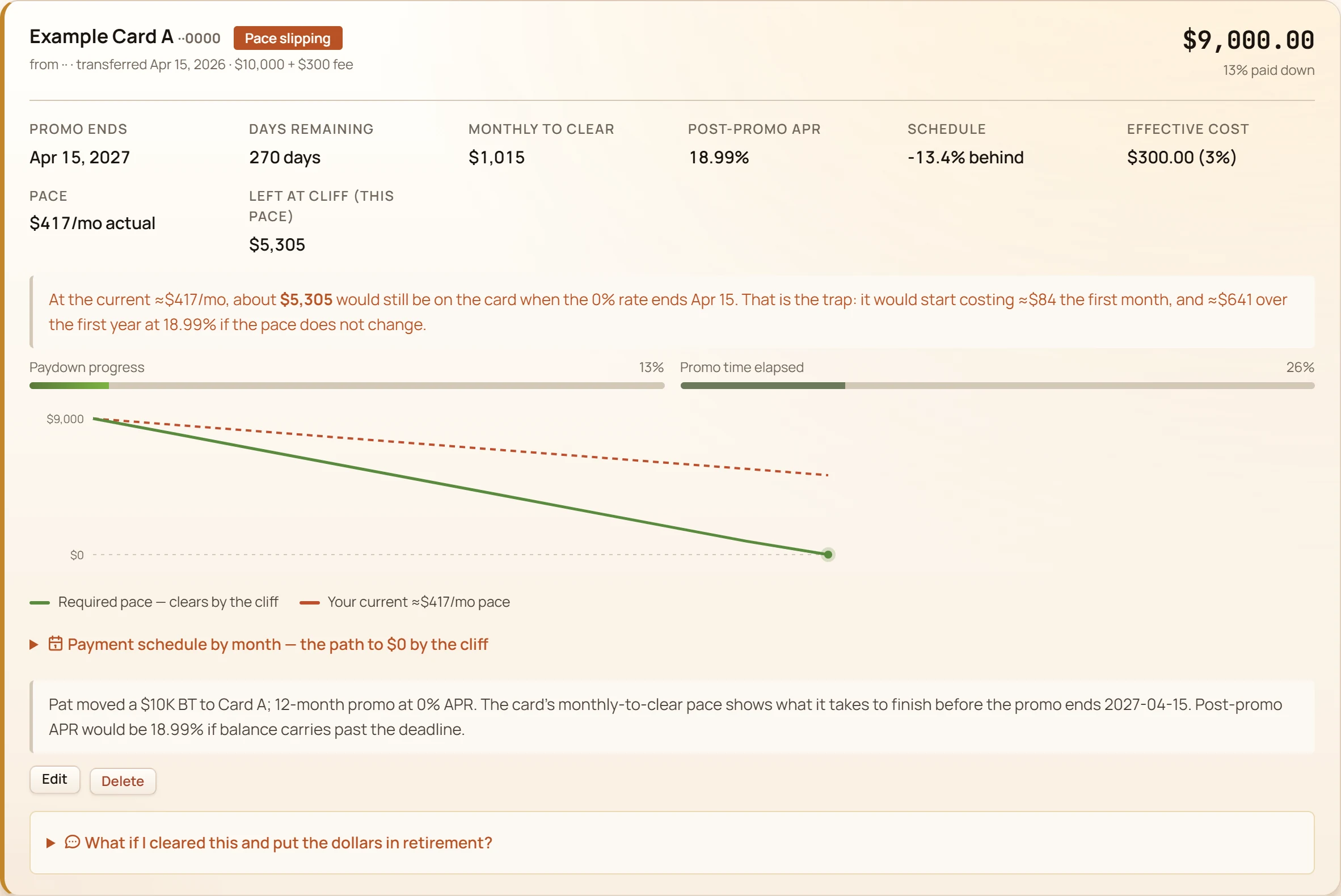
A real transfer card, shown with a fictional demo household — no finance background needed.
For every active transfer, you see
- Monthly to clear — balance ÷ months left, the one number to budget.
- Days remaining — counted to the exact promo end date, color-coded by urgency.
- Post-promo APR — the rate the balance jumps to, shown right alongside.
- Ahead or behind pace — % paid down minus % of promo time elapsed; fall far enough behind and the card flags it.
- Expired-promo estimate — if the deadline already passed, the interest now accruing at the post-promo APR.
- Paydown progress — auto-derived from your account-balance history. No double-entry.
The schedule check is the part a balance-only view misses: when more of the time is gone than the balance, you’re behind pace — even while the statement reads as current.
The cliff at the end is the real cost.
Plenty of calculators tell you a monthly payment. The cliff is the part they leave out.
The day after the promo ends, whatever balance is left starts charging the post-promo APR — often 20–29%. A $9,000 balance carried past the deadline at 22.99% is roughly $2,000 a year in interest you weren’t planning to pay. That’s how most balance-transfer cards work: the new rate applies only to what’s left. Some store-financing “deferred-interest” offers are harsher — they can charge interest back to day one if the balance isn’t cleared in time — so check which kind your statement terms describe.
That promo end date and post-promo APR live in the cardholder-agreement PDF you signed — which is exactly why the automatic bank feeds most budgeting apps rely on usually don’t carry them. GlidePath keeps both in view, counts down the days, and once a promo expires it estimates the interest now accruing — so the cliff is never a surprise. The full pre-deadline routine is in the 0% Cliff Checklist.
One balance-sized retirement comparison, three lenses.
The panel does not simulate a payoff. It asks how the recorded retirement plan changes if an amount equal to this card’s current balance were already in the primary 401(k).
Open the what-if panel under any transfer and GlidePath changes exactly one projection input: the primary 401(k) starting balance. It shows a current-year marginal-rate tax illustration, the future value of the full balance-sized bump at your return assumption, and the change in your Monte Carlo success rate from a same-seed 500-trial comparison. The tax tile caps the deduction at your remaining plan room and prices it across the brackets it crosses; the deferral/match split and your plan compensation are still yours to confirm. The panel does not remove the card debt, calculate interest saved, or turn a freed payment into recurring contributions.
The simulator marches month-by-month, applies the right APR for each card (including 0% promos and post-promo cliffs), and shows the dollar difference between avalanche, snowball, and promo-aware order.
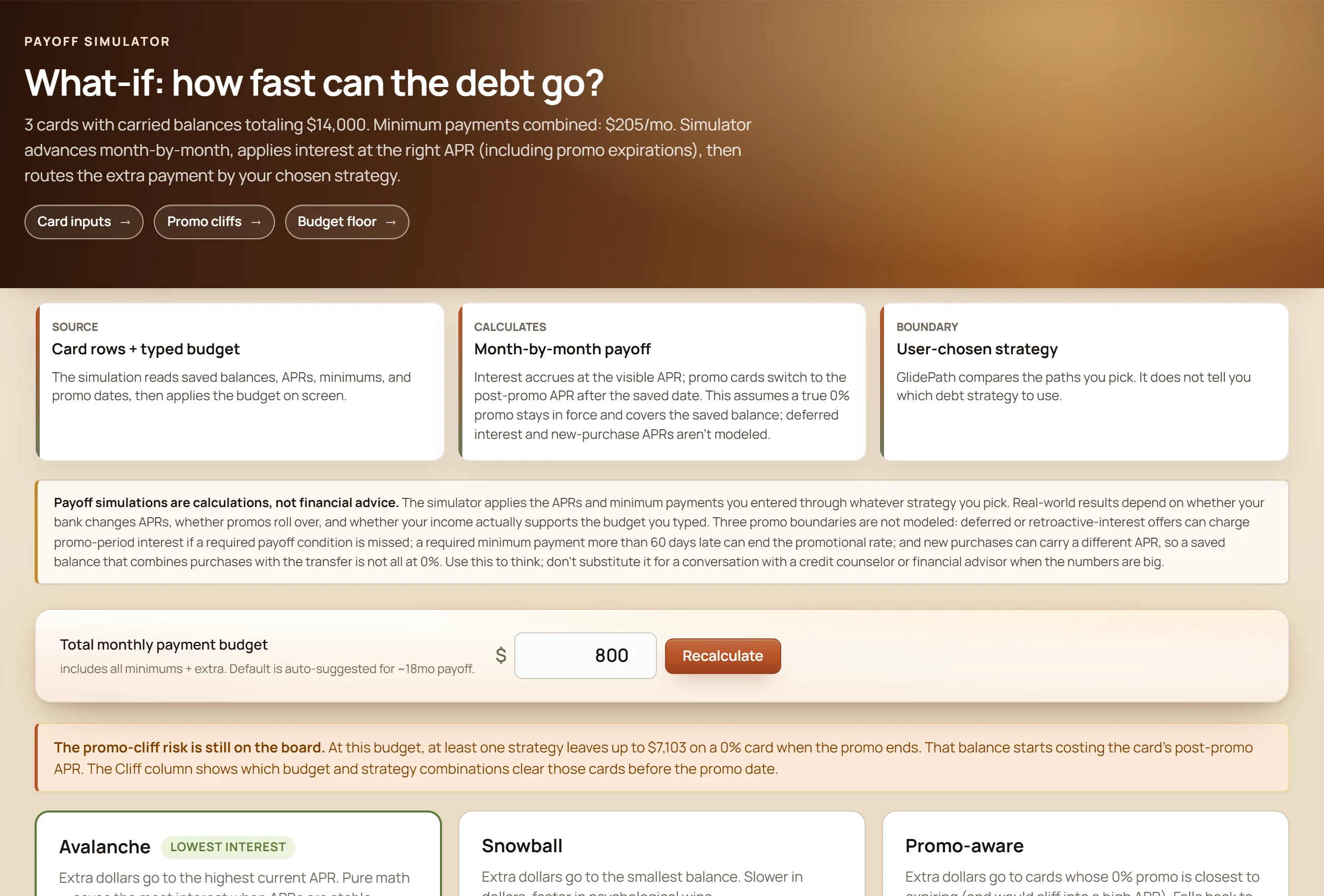
Avalanche kills the highest APR first; snowball the smallest balance first; promo-aware the cards whose 0% is about to expire. The simulator runs all three so you can compare, not pick for you.
Common questions.
How do I calculate the monthly payment to pay off a 0% balance before the promo ends?
Divide the current balance by the months left until the promo expires. GlidePath shows this as the Monthly to clear figure on every transfer, recomputed as your balance changes, so you can see at a glance whether your current payment reaches $0 in time.
What happens when the 0% promo ends?
Any balance still on the card is charged the post-promo APR — often 20–29%. GlidePath shows the post-promo APR and the exact end date up front, and once a promo expires it estimates the interest now accruing. Some cards charge deferred interest back to day one, so confirm your card’s terms.
Am I on pace to pay it off in time?
GlidePath compares the share of the balance you’ve paid down against the share of the promo window that’s elapsed. If more time is gone than balance, you’re behind pace — and the card flags it, even when the statement reads as current.
Does the app tell me what to do with the money?
No. GlidePath shows the monthly pace and cliff, then offers a narrow retirement comparison: the recorded plan versus the same plan with the card’s current balance added once to the primary 401(k) starting balance. It does not clear the card, calculate interest saved, or invest a freed monthly payment. The decision is yours. For your specific situation, talk to a fiduciary advisor or CPA.
See the pace and the cliff in one place.
$129 desktop license. Unlimited cards and 0% promos. Your installed version keeps working if maintenance lapses; first year included, then another year of current tax rules and bank parsers is an optional one-time $39 payment.
GlidePath shows you the math — for your specific situation, talk to a fiduciary advisor or CPA.